Billing FAQ
Q. What is the "Calculation Method" setting (sum/max) for meter units?
A. The "Calculation Method" setting for meter units is a function that specifies how metering data is aggregated.
When Stripe integration is enabled, the "Calculation Method" (sum or max) that can be configured in the UI not only calculates billing amounts to Stripe but also determines how the count values are calculated in metering-related APIs.
Note that when Stripe integration is not enabled, this setting item is not displayed in the UI, but the aggregation method defaults to sum (total).
Specifically, the count values returned by the following APIs change according to the aggregation settings:
- Get Metering Unit Count for Specific Date
- Get Metering Unit Count for the Current Day
- Get Metering Unit Count for the Current Month
- Get the Metering Unit Count for the Specified Month
- Get All Metering Unit Counts for a Specified Date
- Get All Metering Unit Counts for the Specified Month
Differences in count values based on aggregation method
When sum (total) is set:
The API returns a count that is the sum of metering values recorded within the specified period (daily or monthly).
When max (maximum) is set:
The API returns a count that is the maximum value of metering values recorded within the specified period (daily or monthly).
Q. What is the role division between SaaSus Platform and Stripe?
A. SaaSus Platform manages "usage plans" while Stripe handles "payment and billing operations." The extent to which SaaSus Platform features can be utilized depends on the sales model (self-serve vs sales-led).
- Self-serve (automation recommended): Subscription creation and updates can be automatically executed based on SaaSus Platform pricing plan definitions.
- Sales-led (manual handling): SaaSus Platform only handles customer ID (Stripe Customer) linking, while specific invoice creation and complex pricing configurations are done directly from the Stripe dashboard.
Q. How should billing information (company name and address) be registered and managed?
A. The registration path varies depending on the sales model, but information is synchronized to Stripe via SaaSus Platform. To minimize security risks, credit card information is not stored on the SaaSus Platform side but is entered directly on Stripe screens.
- Self-serve: End users register through input screens in the app.
- Sales-led: Sales representatives enter information on behalf of customers from the "SaaS Operations Console."
Q. Are payment screens such as 3D Secure (authentication) provided by SaaSus Platform?
A. No, SaaSus Platform does not have functionality to display payment authentication screens (popups, etc.). While backend payment creation instructions are performed, when browser authentication is required, you need to integrate Stripe-provided features (such as Hosted Invoice Page).
Q. We want to send thank-you emails when payments are completed. Does SaaSus Platform send webhook notifications?
A. No, SaaSus Platform does not relay Stripe webhook events. For real-time processing such as immediate email sending upon payment completion or refund detection, you need to implement direct Stripe Webhook reception on your own server.
Q. Can refund processing, invoice reissuing, and coupon application be done from the console?
A. No, these irregular operations and individual responses need to be handled directly from the Stripe dashboard.
- Refunds and invoice reissuing: Since SaaSus Platform does not have these features, please handle them directly on the Stripe side.
- Invoice payments: Invoice sending for non-credit card payments (bank transfers, etc.) also needs to be done on the Stripe side.
- Coupons (discounts): Individual discounts for specific tenants should be linked to the target Customer or subscription from the Stripe dashboard.
Q. An internal error occurs when trying to create a pricing plan. Is there a solution?
A. Data inconsistency may have occurred between SaaSus Platform and Stripe. Particularly when resources are directly manipulated from the Stripe console, errors can occur due to the following causes:
-
Main Causes
-
Duplicate meter (measurement item) names
If a meter name you are trying to define in SaaSus Platform (e.g., project_count) already exists with the same name on the Stripe side, plan creation will fail. In this case, please delete the corresponding meter on the Stripe side or try creating a different meter name on SaaSus Platform. -
Impact of direct operations in Stripe
If you directly create subscriptions, set coupons, or initialize plans from the Stripe management console without going through SaaSus Platform, synchronization between the two systems may not work correctly.
-
-
Solution
To resolve data inconsistencies, you may need to disconnect and reconnect the Stripe integration. This allows you to attempt synchronization with the correct status again.
When disconnecting and reconnecting in a production environment, please be careful as it may affect existing customer data and billing status.
- Recommended Operations
To prevent configuration inconsistencies, we recommend performing operations such as defining pricing plans and meters and managing subscriptions from the SaaSus Development Console whenever possible.
Q. Can we apply campaigns such as "first few months free" or "limited-time discounts" to specific customers?
A. Currently, SaaSus Platform does not support promotional features such as "coupons" or "first-time discounts" provided by Stripe.
-
Supported measurement units
SaaSus Platform allows pricing plan design based on the following four measurement units:- Fixed unit (fixed): Fixed amounts such as monthly basic fees
- Usage unit (usage): Pay-per-use charges added per unit (such as number of users)
- Tiered unit (tiered): Fixed charges set in stages according to usage
- Tiered usage unit (tiered_usage): Volume discount format where unit price changes as usage increases
-
Direct operations on Stripe console and precautions
It is technically possible to apply discounts directly from Stripe's management console to subscriptions created on SaaSus Platform.
However, you must never change the subscription itself without going through SaaSus Platform. This could cause data inconsistency between SaaSus Platform and Stripe, preventing correct billing and meter updates. -
Alternative approaches for discounts and campaigns
If you want to achieve "first month free" or "specific period discounts," please consider creating a separate campaign-specific pricing plan with a basic fee set to "0 yen" in the SaaSus Development Console and assigning it to target tenants. -
Future roadmap
Direct integration with Stripe's promotional features is being considered on our roadmap for future feature enhancements based on customer needs.
Q. Can bank transfers be enabled on SaaSus Platform?
A. Currently, there is no feature to directly enable "bank transfer" from the SaaSus Platform management screen. However, you can enable bank transfer payments by changing settings directly from the integrated Stripe management console.
-
Setup procedure and precautions
After setting up a pricing plan (creating a subscription) on SaaSus Platform, please configure the target subscription to allow "bank transfer" from the Stripe Dashboard within the time it takes for the invoice to be confirmed on the Stripe side (within approximately 1 hour). -
Limitations regarding measurement units
When changing settings directly from the Stripe console, you must never change the "measurement units (units or calculation logic)" defined and integrated with SaaSus Platform.
Changing measurement units can cause data inconsistency between SaaSus Platform and Stripe, preventing correct meter updates and billing.
Q. We plan to expand globally to the United States (US) and Europe (EU) in the future. Do you support payments in local currencies for each country?
A. SaaSus Platform supports the creation of pricing plans in major payment currencies: Japanese Yen (JPY) and US Dollar (USD).
-
Currency operations through Stripe integration
By integrating with Stripe, you can centrally manage not only domestic Japanese deployments but also revenue models for global business using US dollars (USD) from the SaaSus console. -
Service regions and compliance
We currently provide services centered on ap-northeast-1 (Tokyo Region). While common endpoints can be used from many regions including the United States (US), for the European Union (EU) region, API access is currently blocked from the perspective of strict compliance with GDPR (General Data Protection Regulation) and security governance. -
Future expansion
We are progressively considering the expansion of support areas and supported currencies in line with customer business growth, while monitoring trends in regulations in each country. If you have specific plans to use our service in a particular region or have requests regarding compliance with regulations, please consult our support team in advance so we can consider individual responses.
Q. Can we set measurement units to "per user" and analyze individual usage?
A. No, SaaSus Platform's metering function (measurement items) currently only supports aggregation on a per-tenant basis. We do not provide functionality to directly measure or aggregate individual user usage.
How to achieve per-user analysis
If you want to analyze resource consumption or behavior logs for specific users in detail, we recommend building a mechanism to accumulate and aggregate logs externally to SaaSus Platform (on your application side).
Q. Can we download past receipts and invoices from the SaaSus Platform management console?
A. Currently, the SaaSus Platform management console does not provide a screen where customers can directly download receipts. Please confirm and obtain them through the following methods:
-
Confirmation via automatically sent emails
When payment is completed, a receipt email is automatically sent from the integrated Stripe. First, please check the inbox of your registered email address.
*For Stripe's management console (Settings > Email), the setting to send emails to customers upon "payment success" must be enabled. If you have not received it, please check the Stripe side settings.
Note that the names and locations of setting items may change due to Stripe specification changes, so please also refer to the latest Stripe documentation. -
Download from Stripe management console
Administrators can log in to the integrated Stripe management console at any time to download receipts and invoices associated with the target payment in PDF format.
Q. If we upgrade or downgrade a plan in the middle of the month, what happens to billing and proration?
A. SaaSus Platform supports proration using Stripe's functionality.
You can control the timing of differential billing through operations from the operations console or API parameter settings.
*Operations from the operations console result in immediate billing.
- Proration logic (calculation example)
Calculations are based on Stripe's standard logic (calculated by seconds).
Example: If you contract Plan A (25,000 yen) on March 1st and change to Plan B (28,000 yen) on March 21st (March has 31 days)
-
In the case of upgrade (Plan A → Plan B)
Refund for unused portion of Plan A (old): approximately -8,064 yen
Usage fee for remaining period of Plan B (new): approximately +9,032 yen
Difference (adjustment amount): +968 yen will occur. -
In the case of downgrade (Plan B → Plan A)
The difference is -968 yen, and this negative amount is retained as "unused credit" within Stripe.
This credit will be applied during the next regular billing (on April 1st).
Example: April amount 25,000 yen - credit 968 yen = billed amount 24,032 yen
- Behavior settings when changing plans (proration_behavior)
When changing plans using the Update Tenant Plan Information API, you can specify the billing timing by the value of the proration_behavior parameter.
| proration_behavior | Billing method | Details |
|---|---|---|
| always_invoice | Immediate billing | The moment you change plans, an invoice for the prorated difference is issued and charged. |
| create_prorations | Next billing consolidation | The difference is calculated but not immediately billed. It will be consolidated at the next regular billing timing. |
| none | No proration | Proration is not performed at the time of change. The new plan's fixed charge will be applied from the next regular billing. |
Q. Can unused pay-as-you-go menu items (0 yen) be hidden from Stripe invoices?
A. No, due to the current specifications of SaaSus Platform and the integrated Stripe, items with no usage (0 yen) cannot be hidden from invoices.
Q. Can annual contract plans be combined with monthly fixed options or usage-based charges (usage units)?
A. To maintain billing transparency and consistency, SaaSus Platform (and its integrated Stripe) cannot combine different billing cycles (such as annual and monthly) within a single subscription.
Q. Can I delete a pricing plan that I have created?
A. The ability to delete pricing plans depends on your environment.
For development and staging environments
Once metering units, feature menus, and pricing plans have been used, they cannot be deleted.
However, for development and staging environments only, you can initialize the entire pricing plan. This initialization operation can be performed not only through the SaaSus API(PUT /auth/plans/reset)
but also directly from the SaaS Development Console screen.
For production environments
Once metering units, feature menus, and pricing plans have been used, they cannot be deleted.
When setting and applying pricing plans in a production environment, please thoroughly review the configuration in advance.
Q. How is the representative email address used?
A. The representative email address is used as the destination for sending invoices.
Q. In the Stripe test environment, subscriptions get canceled after a while and the integration with SaaSus Platform breaks. Can this be avoided?
A. In the Stripe test environment, by specification, subscriptions are automatically canceled 90 days after creation. As a result, only the Stripe side becomes canceled, which can cause a state inconsistency between SaaSus Platform and Stripe.
- How to avoid this
Open the target subscription in the Stripe dashboard, and from the "..." menu to the right of "Update subscription", select "Exclude from auto-cancellation". This excludes the subscription from the 90-day automatic cancellation in the test environment.
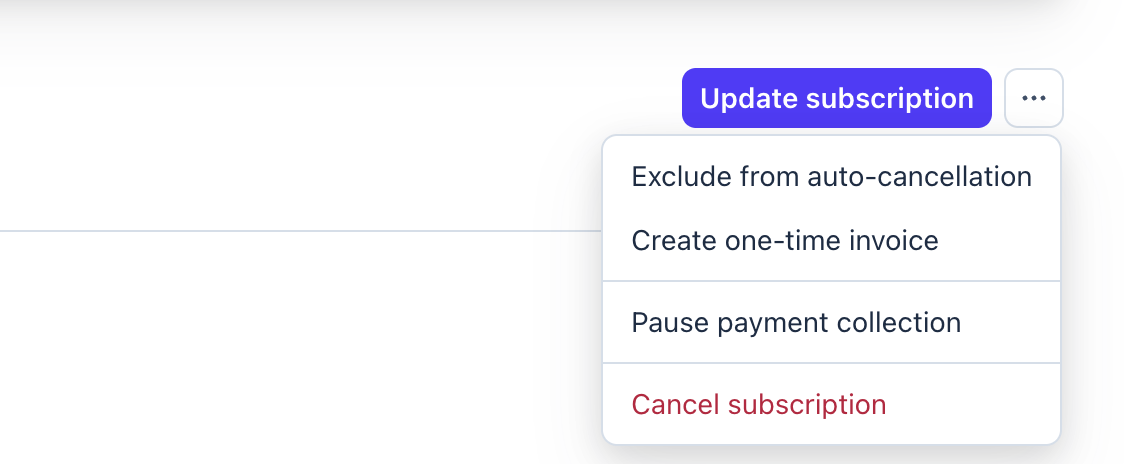
This is behavior specific to the Stripe test environment and does not occur in the production environment. The names and locations of setting items may change due to Stripe specification changes, so please also refer to the latest Stripe documentation.
Q. How do I change the credit card used for billing?
A. You can change your credit card yourself from the Stripe customer portal. Because SaaSus Platform does not store card information, the change is made on the Stripe portal.
- Open the login screen of the customer portal.
- Enter your registered email address (the destination for invoice notifications) and submit.
- An email containing a login link is sent to that address. Open the link to log in to the portal.
- Register your new credit card from [Payment methods] in the portal. You can delete the existing card after registering the new one.
If the login email does not arrive, your registered email address may differ from the destination for invoice notifications. In that case, please contact support.