Multi-Factor Authentication
This page explains how to implement Multi-Factor Authentication (MFA) functionality using the SaaSus Auth API, based on the sample application's MFA settings feature.
The sample application supports the following two authentication methods:
- Authenticator App (TOTP): Uses one-time codes generated by authenticator apps such as Google Authenticator or Authy
- Email Authentication: Sends an authentication code to the registered email address at login
Users who use "Email" as their Multi-Factor Authentication (MFA) method cannot reset their password from the login screen generated by SaaSus Platform.
To reset the password for such users, an administrator must perform the password reset from the User Management screen in the SaaS Operation Console.
Below is a screenshot of the multi-factor authentication settings dialog.
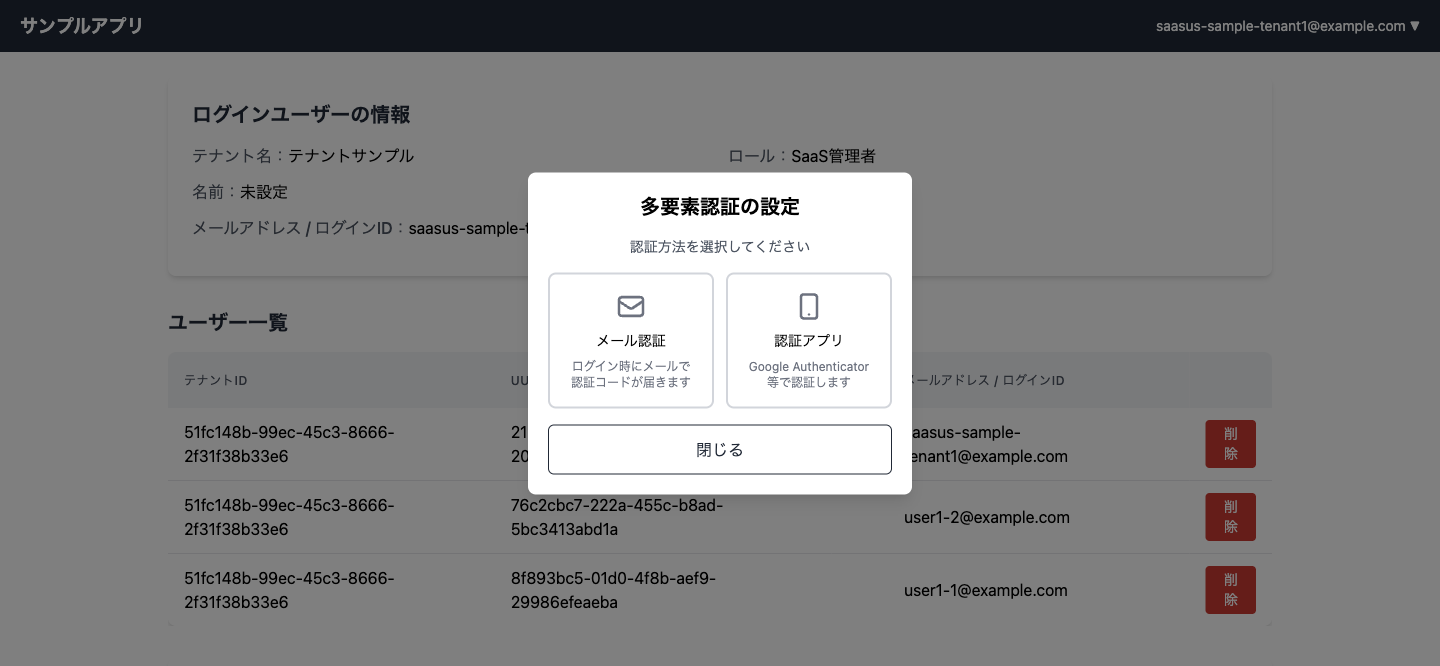
The MFA functionality provides the following features:
- Check MFA settings status and authentication method
- Select authentication method (Authenticator App / Email)
- Register authentication applications (Google Authenticator, etc.)
- Enable/disable MFA
- Easy setup with QR codes
- Switch between authentication methods
To use email authentication, you must complete domain name settings and email sending domain authentication (DKIM) in SaaSus Platform. See Domain, Email Sending Domain Authentication, and Redirect Settings for details.
Frontend Implementation
Authentication Method Selection UI Flow
The frontend manages the MFA settings dialog display using a state machine.
- When the dialog opens, it fetches MFA status via
GET /mfa_status - If not configured, it displays the method selection screen (card selection for Authenticator App / Email)
- If Authenticator App is selected, it transitions to QR code display and verification code input
- If Email is selected, it displays a confirmation screen and executes enablement
- If already configured, it displays the current method and allows switching to another method or disabling
Example Implementations
The following links point to repositories that include implementations of the frontend.
- React:
UserMfaSettingDialog.tsx- MFA Settings Dialog Component - React:
HeaderUserbox.tsx- Header User Menu
Backend Implementation
Endpoint Summary
| Type | Method & Path | Description |
|---|---|---|
| MFA Status Check | GET /mfa_status | Retrieves the user's MFA enabled/disabled status and authentication method. |
| MFA Setup | GET /mfa_setup | Generates QR code URL for authentication app registration. |
| MFA Code Verification | POST /mfa_verify | Verifies authentication code from authentication app and registers MFA. |
| MFA Enable (Authenticator App) | POST /mfa_enable | Enables MFA with authenticator app method. |
| MFA Enable (Email) | POST /mfa_email_enable | Enables MFA with email authentication method. |
| MFA Disable | POST /mfa_disable | Disables MFA for the user. |
The following code samples assume Go for the backend.
MFA Status Check Endpoint
GET /mfa_status returns the MFA enabled/disabled status along with the currently configured authentication method (softwareToken or email).
- Go
// Retrieve MFA status (enabled/disabled and authentication method)
func getMfaStatus(c echo.Context) error {
	// Retrieve user information from context
	userInfo, ok := c.Get(string(ctxlib.UserInfoKey)).(*authapi.UserInfo)
	if !ok {
		c.Logger().Error("Failed to get user info")
		return c.JSON(http.StatusInternalServerError, map[string]string{"error": "Failed to retrieve user information"})
	}

	// Use the SaaSus API to get the user's MFA settings
	response, err := authClient.GetUserMfaPreferenceWithResponse(context.Background(), userInfo.Id)
	if err != nil || response.JSON200 == nil {
		c.Logger().Errorf("failed to get MFA status: %v", err)
		return c.JSON(http.StatusInternalServerError, map[string]string{"error": "Failed to retrieve MFA status"})
	}

	// Return MFA enabled/disabled status and authentication method
	result := map[string]interface{}{
		"enabled": response.JSON200.Enabled,
	}
	if response.JSON200.Method != nil {
		result["method"] = string(*response.JSON200.Method)
	}
	return c.JSON(http.StatusOK, result)
}
Response examples:
{ "enabled": true, "method": "softwareToken" }
{ "enabled": true, "method": "email" }
{ "enabled": false }
Implementation Example Links
The following links contain implementations of this endpoint. Search for the function name to find the relevant section.
- Go (Echo):
getMfaStatus - Python (FastAPI):
get_mfa_status - Java (Spring):
getMfaStatus - C# (.NET 8):
app.MapGet("/mfa_status" - C# (.NET Framework 4.8):
GetMfaStatus
MFA Setup Endpoint
Used when setting up MFA with the authenticator app method. Generates a QR code URL for the user to scan with their authenticator app to register a TOTP device.
- Go
// Retrieve MFA setup information (generate QR code)
// The frontend application must include X-Access-Token in the request header
func getMfaSetup(c echo.Context) error {
	// Retrieve X-Access-Token from the request header
	accessToken := c.Request().Header.Get("X-Access-Token")
	if accessToken == "" {
		// Return authentication error if access token is missing
		return c.JSON(http.StatusUnauthorized, map[string]string{"error": "Access token is missing"})
	}

	// Retrieve user information from context
	userInfo, ok := c.Get(string(ctxlib.UserInfoKey)).(*authapi.UserInfo)
	if !ok {
		c.Logger().Error("failed to get user info")
		return c.JSON(http.StatusInternalServerError, map[string]string{"error": "Failed to retrieve user information"})
	}

	// Use the SaaSus API to generate a secret code for MFA authentication app registration
	response, err := authClient.CreateSecretCodeWithResponse(context.Background(), userInfo.Id, authapi.CreateSecretCodeJSONRequestBody{
		AccessToken: accessToken,
	})
	if err != nil || response.JSON201 == nil {
		c.Logger().Errorf("failed to create secret code: %v", err)
		return c.JSON(http.StatusInternalServerError, map[string]string{"error": "Failed to generate QR code"})
	}

	// Generate a QR code URL for Google Authenticator and other authentication apps
	qrCodeUrl := "otpauth://totp/SaaSusPlatform:" + userInfo.Email + "?secret=" + response.JSON201.SecretCode + "&issuer=SaaSusPlatform"

	// Return the QR code URL
	return c.JSON(http.StatusOK, map[string]string{
		"qrCodeUrl": qrCodeUrl,
	})
}
Implementation Example Links
The following links contain implementations of this endpoint. Search for the function name to find the relevant section.
- Go (Echo):
getMfaSetup - Python (FastAPI):
get_mfa_setup - Java (Spring):
getMfaSetup - C# (.NET 8):
app.MapGet("/mfa_setup" - C# (.NET Framework 4.8):
SetupMfa
MFA Authentication Code Verification Endpoint
Verifies the 6-digit code generated by the authenticator app and registers the TOTP device.
- Go
// Verify the user's MFA authentication code
// The frontend application must include X-Access-Token in the request header
func verifyMfa(c echo.Context) error {
	// Retrieve user information from context
	userInfo, ok := c.Get(string(ctxlib.UserInfoKey)).(*authapi.UserInfo)
	if !ok {
		c.Logger().Error("Failed to get user info")
		return c.JSON(http.StatusInternalServerError, map[string]string{"error": "Failed to retrieve user information"})
	}

	// Retrieve X-Access-Token from the request header
	accessToken := c.Request().Header.Get("X-Access-Token")
	if accessToken == "" {
		return c.JSON(http.StatusUnauthorized, map[string]string{"error": "Access token is missing"})
	}

	// Retrieve the verification code from the request body
	var requestBody struct {
		VerificationCode string `json:"verification_code"`
	}
	if err := c.Bind(&requestBody); err != nil {
		return c.JSON(http.StatusBadRequest, map[string]string{"error": "Invalid request: malformed JSON or incorrect parameters"})
	}
	if requestBody.VerificationCode == "" {
		return c.JSON(http.StatusBadRequest, map[string]string{"error": "Verification code is required"})
	}

	// Use the SaaSus API to register the authentication application
	response, err := authClient.UpdateSoftwareTokenWithResponse(context.Background(), userInfo.Id, authapi.UpdateSoftwareTokenJSONRequestBody{
		AccessToken:      accessToken,
		VerificationCode: requestBody.VerificationCode,
	})
	if err != nil || response.StatusCode() != http.StatusOK {
		c.Logger().Errorf("MFA verification failed: Status Code %d, Response %s", response.StatusCode(), string(response.Body))
		return c.JSON(http.StatusInternalServerError, map[string]string{"error": "MFA verification failed"})
	}

	return c.JSON(http.StatusOK, map[string]string{"message": "MFA verification successful"})
}
Implementation Example Links
The following links contain implementations of this endpoint. Search for the function name to find the relevant section.
- Go (Echo):
verifyMfa - Python (FastAPI):
verify_mfa - Java (Spring):
verifyMfa - C# (.NET 8):
app.MapPost("/mfa_verify" - C# (.NET Framework 4.8):
VerifyMfa
MFA Enable Endpoint (Authenticator App)
Called after successful verification code validation to enable MFA with the authenticator app method.
- Go
// Enable MFA (Authenticator App)
func enableMfa(c echo.Context) error {
	// Retrieve user information from context
	userInfo, ok := c.Get(string(ctxlib.UserInfoKey)).(*authapi.UserInfo)
	if !ok {
		return c.JSON(http.StatusInternalServerError, map[string]string{"error": "Failed to retrieve user information"})
	}

	// Create request body to enable MFA with authenticator app
	method := authapi.MfaPreferenceMethodSoftwareToken
	requestBody := authapi.UpdateUserMfaPreferenceJSONRequestBody{
		Enabled: true,
		Method:  &method,
	}

	// Use the SaaSus API to enable MFA
	_, err := authClient.UpdateUserMfaPreferenceWithResponse(context.Background(), userInfo.Id, requestBody)
	if err != nil {
		c.Logger().Errorf("Failed to enable MFA: %v", err)
		return c.JSON(http.StatusInternalServerError, map[string]string{"error": "Failed to enable MFA"})
	}

	return c.JSON(http.StatusOK, map[string]string{"message": "MFA has been enabled"})
}
Implementation Example Links
The following links contain implementations of this endpoint. Search for the function name to find the relevant section.
- Go (Echo):
enableMfa - Python (FastAPI):
enable_mfa - Java (Spring):
enableMfa - C# (.NET 8):
app.MapPost("/mfa_enable" - C# (.NET Framework 4.8):
EnableMfa
MFA Enable Endpoint (Email Authentication)
Currently, only the Go and JavaScript SDKs support enabling MFA with the email authentication method.
Enables MFA with the email authentication method. Unlike the authenticator app method, device registration (setup/verify) is not required. Once enabled, an authentication code will be sent to the registered email address at next login.
- Go
// Enable MFA with email authentication
func enableMfaEmail(c echo.Context) error {
	// Retrieve user information from context
	userInfo, ok := c.Get(string(ctxlib.UserInfoKey)).(*authapi.UserInfo)
	if !ok {
		return c.JSON(http.StatusInternalServerError, map[string]string{"error": "Failed to retrieve user information"})
	}

	// Create request body to enable MFA with email authentication
	method := authapi.MfaPreferenceMethodEmail
	requestBody := authapi.UpdateUserMfaPreferenceJSONRequestBody{
		Enabled: true,
		Method:  &method,
	}

	// Use the SaaSus API to enable MFA with email authentication
	_, err := authClient.UpdateUserMfaPreferenceWithResponse(context.Background(), userInfo.Id, requestBody)
	if err != nil {
		c.Logger().Errorf("Failed to enable email MFA: %v", err)
		return c.JSON(http.StatusInternalServerError, map[string]string{"error": "Failed to enable email MFA"})
	}

	return c.JSON(http.StatusOK, map[string]string{"message": "Email MFA has been enabled"})
}
Implementation Example Links
The following links contain implementations of this endpoint. Search for the function name to find the relevant section.
- Go (Echo):
enableMfaEmail - Python (FastAPI): To be added after SDK support for email authentication method
- Java (Spring):
enableMfaEmail(Available on feature branch, pending SDK release) - C# (.NET 8): To be added after SDK support for email authentication method
- C# (.NET Framework 4.8): To be added after SDK support for email authentication method
MFA Disable Endpoint
- Go
// Disable MFA for the user
func disableMfa(c echo.Context) error {
	// Retrieve user information from context
	userInfo, ok := c.Get(string(ctxlib.UserInfoKey)).(*authapi.UserInfo)
	if !ok {
		return c.JSON(http.StatusInternalServerError, map[string]string{"error": "Failed to retrieve user information"})
	}

	// Create request body to disable MFA
	method := authapi.MfaPreferenceMethodSoftwareToken
	requestBody := authapi.UpdateUserMfaPreferenceJSONRequestBody{
		Enabled: false,
		Method:  &method,
	}

	// Use the SaaSus API to disable MFA
	_, err := authClient.UpdateUserMfaPreferenceWithResponse(context.Background(), userInfo.Id, requestBody)
	if err != nil {
		c.Logger().Errorf("Failed to disable MFA: %v", err)
		return c.JSON(http.StatusInternalServerError, map[string]string{"error": "Failed to disable MFA"})
	}

	return c.JSON(http.StatusOK, map[string]string{"message": "MFA has been disabled"})
}
Implementation Example Links
The following links contain implementations of this endpoint. Search for the function name to find the relevant section.
- Go (Echo):
disableMfa - Python (FastAPI):
disable_mfa - Java (Spring):
disableMfa - C# (.NET 8):
app.MapPost("/mfa_disable" - C# (.NET Framework 4.8):
DisableMfa